Kits, party packs and crates
Lend several toys together as one kit, such as a party pack or a sensory crate.
Who can do this: coordinators and admins.
A kit is a list of parts: "1 ball pool, 2 play tunnels, 1 parachute". Members book the kit; the desk lends it as one line with the parts underneath. A kit can be packed in one of two ways:
- Flexible: put together when lent. Between bookings, the parts lend on their own as ordinary toys. This is the default, and keeps your most popular toys busy.
- Fixed crate: the parts stay packed in a labelled crate. Each crate has its own code.
Steps
Create a kit
- In the sidebar, choose Toys, then Add toys, then Add one toy.
- Under What is it?, choose A kit or party pack.
- Fill in the name (for example "Party pack: Little Explorers (2 to 4)"), description, fee and other details.
- Under How is the kit packed?, choose Flexible or Fixed crate. For a fixed crate, enter the Number of crates.
- Press Save as a draft. The kit's page opens.
Say what is in it
- On the kit's page, open the Kit tab.
- Under What's in this kit, use Find a product to add to add each part, and set how many of each.
- Tick Optional for a part that is nice to have but should never stop a booking.
- Press Save components.
Check when it can be booked
- On the Kit tab, go to Can it be booked?.
- Choose the Site and a From date, then press Check.
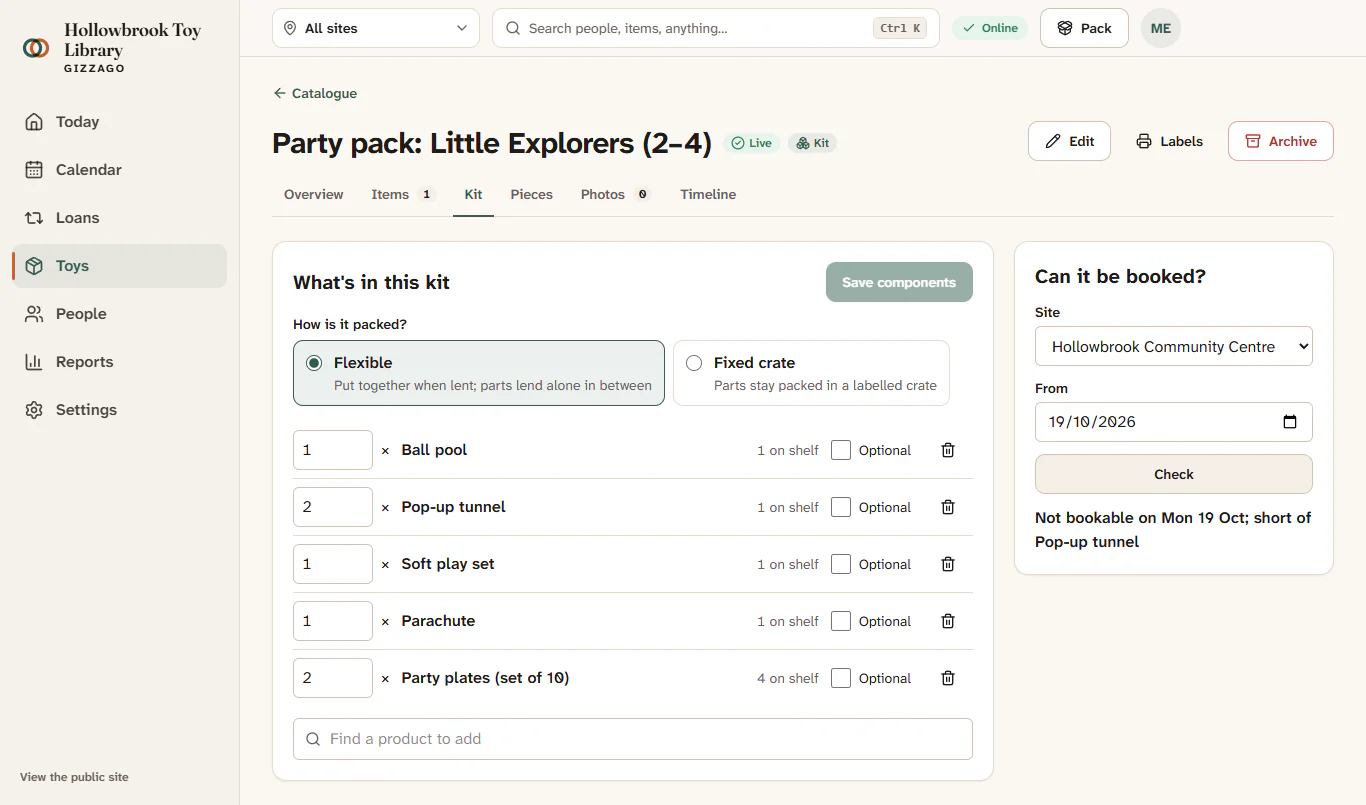
What you'll see
A line such as "Bookable once on Sat 18 Oct; limited by Pop up play tunnel". The part named is the one that runs out first. Add more of that part, or mark it Optional, to allow more bookings.
Take a part out of a crate, and refill it
For fixed crates only.
- On the kit's Kit tab, under Crates, click a crate code (it shows Complete or Short of a part).
- Under In this crate, press Take out next to a part, then Take out in the panel. Use this when a part is broken or needed elsewhere.
- The crate now shows a badge such as "Short of 1 Light-up sensory ball". Press Refill from shelf next to it to pack a replacement from the shelf.
- To pack a particular copy, press Pack an item, scan or type its Item code, then press Pack into crate.
Good to know
- Kits cannot contain other kits.
- On the toy page of a part, Part of lists the kits it belongs to.
- At the desk, a kit is lent as one line with its fee, and its parts are listed underneath.
- At return, each part is checked on its own, so you can see which piece of a party pack came back short.