Take toys back and check the pieces
Take a toy back, check it is complete, and send it to the shelf, the wash or the repair box.
Who can do this: desk volunteers, coordinators and admins, with the desk open.
You do not need the member to be there, or loaded, to take a toy back. Scan the toy and Gizzago finds the loan.
Steps
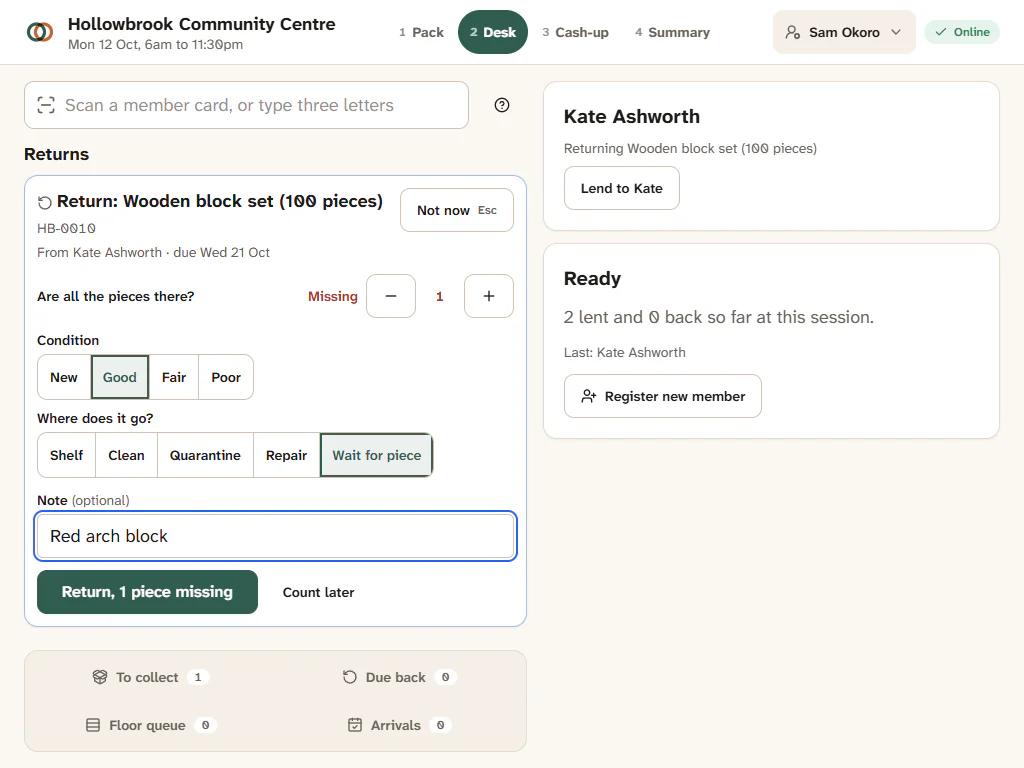
- Scan the toy (or type its name and choose Return). A return card opens: the toy, who had it and when it was due ("From Kate Ashworth · due Sat 17 Oct"), and any pieces already known to be missing.
- Check the pieces. What you see depends on how the toy is set up:
- Are all the pieces there?: if they are, do nothing; if not, press + next to Missing once for each missing piece;
- a piece list: tap any piece that is missing (tap again, or use the buttons, if more than one is missing);
- Count the pieces: step the number that came back ("11 of 12");
- no check at all, for toys with no small parts.
- If something is missing, a Note box appears: describe it in a few words ("Red arch block"). Members will see this, so be kind.
- Check Condition (Good, Fair or Poor) and Where does it go?: Shelf, Clean, Quarantine, Repair or Wait for piece. A toy with a piece missing is set to Wait for piece for you; change it if you like.
- Press the main button. It says what will happen: All there, return it or Return, 1 piece missing. Changed your mind? Not now closes the card without returning anything.
"Returned · on the shelf" (or in the wash, repair, quarantine, waiting for a piece), and "1 missing piece noted" if you recorded one. Undo is there for a few moments if you pressed the wrong thing.
What happens to a missing piece
Gizzago records the missing piece against the toy and against the member. The member gets a friendly email asking them to look for it, and their record shows "Owes 1 piece" at the desk until it is sorted. Coordinators find every open missing piece in Toys > Care: see Care: cleaning, repair, quarantine and missing pieces. A toy that comes back with a piece missing goes to Wait for piece unless you choose somewhere else.
Counted toys: who is returning it?
For a toy kept as a count on one label (say five balance boards), Gizzago may not know whose it is. Press Return it and choose the member from Who is returning it? (they are listed by due date), or Nobody here (book drop) for a toy left in the returns box. If one of a counted set comes back short, choose Top up from spares, Set aside or Lend as incomplete.
Kits and party packs
Each part of a kit has its own check. "Check each part. Part-returns are fine": tick off what came back, and the kit stays open until every part is home.
Busy? Count later
If there is a queue, press Count later and the toy goes to the Floor queue to be counted when there is a moment. See Count later and the Floor queue.
Late returns and fees
The card shows how many days late the toy is and any late fee your library charges. If the member is at the desk, the fee joins their visit; if not, it goes on their account.