Pack for a session
Before the doors open, gather everything that is promised for this session.
Who can do this: desk volunteers, coordinators and admins.
Members reserve toys online up to the cut-off (6pm the day before, unless your library changed it). Before the cut-off the pick list is "provisional"; after it, it is final and will not change under you.
Steps
- Open the session (see Unlock the desk and start a session). Before opening time it starts on Pack. Coordinators can also press Pack on the session card on Today.
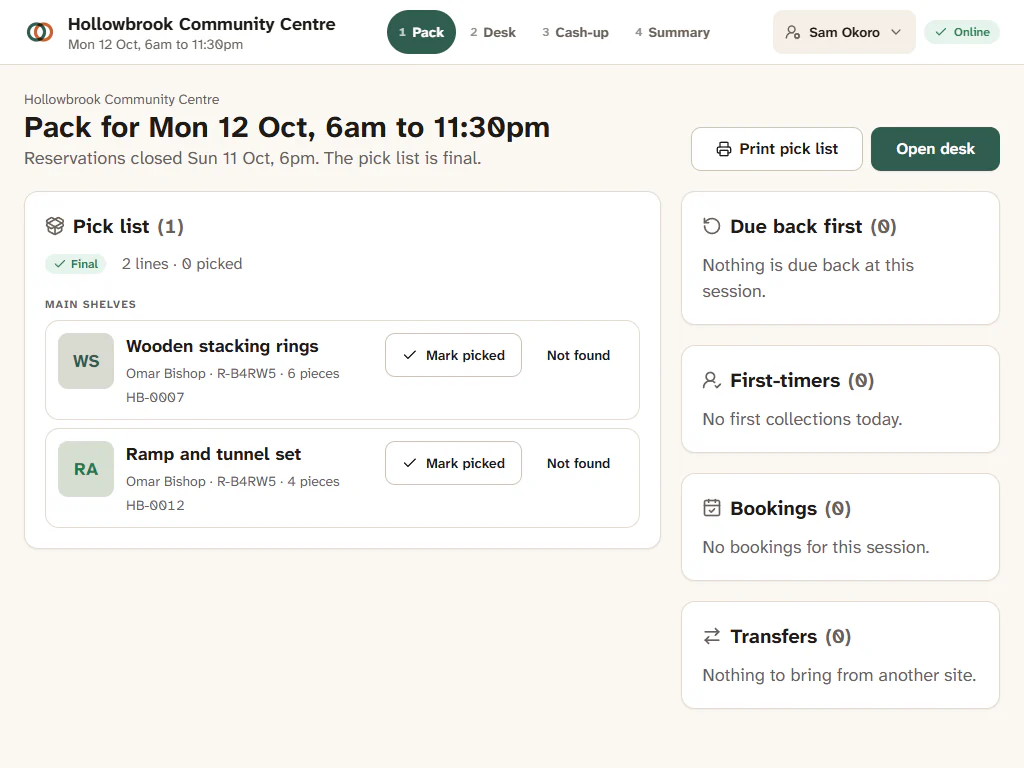
- Work down the Pick list. It is grouped by where things are stored, so you walk the shelves once. Each line shows the toy, its code, its piece count and the member it is for.
- As you put each toy in the member's crate or bag, press Mark picked. If you cannot find one, press Not found and choose Tell the member, Substitute (another copy of the same toy) or Drop it.
- Check Due back first. These toys are reserved for today but are still out with another family, due back at this session. Put them aside as soon as they come in.
- Check First-timers: members collecting for the first time. If your library asks for proof of address, this is your reminder.
- Check Bookings (people booked onto an event at this session) and Transfers (toys to bring from another site).
- To work on paper, press Print pick list. It prints on one A4 sheet with a tick box and a QR code per line.
- When you are ready for families, press Open desk.
Each picked line shows a Picked badge with Undo. When every line of a reservation is picked, the reservation becomes ready, and after the cut-off the member is told their toys are ready to collect. Picking does not move any stock: toys only leave when they are lent at the desk.
Kits and party packs
A kit on the pick list lists its parts with their codes, so you can pack each one. Any copy of the right toy will do, so pick whichever is easiest to reach.