Lend toys
Lend one or more toys to a member in about a minute.
Who can do this: desk volunteers, coordinators and admins, with the desk open.
Steps
- Find the member. Scan their membership card, or type the first few letters of their name (for example "ashw") and press Enter. Choose them from the list.
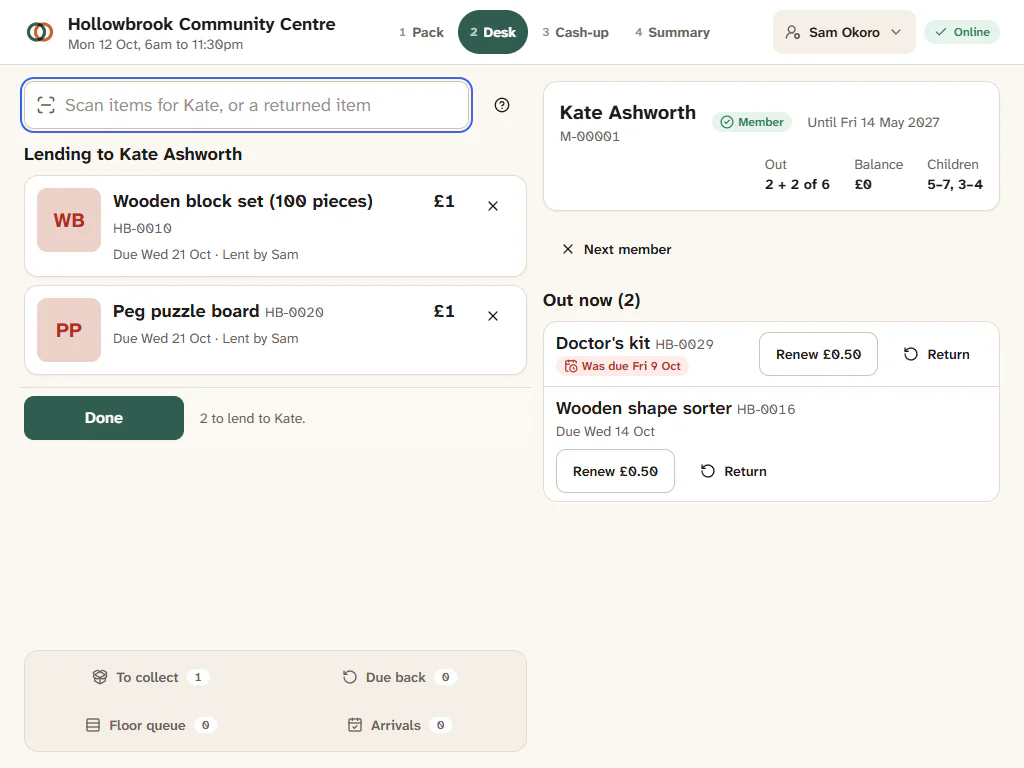
- Check their header. On the right you see their membership and its end date, any balance owed, how many toys they have out against their limit ("Out 2 of 6"), their children's age bands and any flags, such as "Owes 1 piece".
- Scan each toy. Each one becomes a line with its photo, fee, due date and "Loaned by" your name. No barcode? Type a few words of the toy's name and choose it from "Toys like ...".
- Answer anything highlighted. If a line is highlighted (for example the toy is reserved for someone else), deal with it on that line. See When the desk stops a line.
- Press Done. The Pay panel opens with the fees listed.
- Take payment and press Finish payment (or Finish visit when there is nothing to pay).
- Press Next member to clear the screen for the next family.
What you'll see
"All done for Kate Ashworth", with the change to give if they paid cash. The toys now show as on loan on Kate's account, she gets an email receipt if she has an email address, and a reminder will go out before they are due.
Good to know
- The due date is worked out for you from your borrowing rules, and it lands on a session at the site the toy will come back to, so nobody is due back on a day you are closed.
- Counted toys (five balance boards on one label) show One more and One fewer buttons so you can lend more than one.
- Kits add their parts as sub-lines under the kit, with the fee on the kit line.
- Renew a toy they already have. The member's Out now list shows each toy they have at home, with Renew (and its fee) and Return. Press Renew to keep it for another loan period.
- Remove a line with the cross beside it, or press Esc while it is selected.
- Lend from the person page. Coordinators can press Lend on a person's page in People: it opens the desk with that member loaded (a session must be open at the site).
- Membership running out? A Renew line can join the same visit. See Renew a membership at the desk.
- Toy not in the catalogue? See Lend a toy that is not in the catalogue.
- A barcode Gizzago does not know? It offers Add this item now, which lends it as a toy to catalogue later.