When the desk stops a line
Sometimes a line needs a decision before you can finish. Here is how to answer it.
Who can do this: desk volunteers can acknowledge and remove lines; overriding needs the right role (usually a coordinator).
Gizzago never throws a pop-up at you. When something needs a decision, the line is highlighted and the reason is written on it. Done stays greyed out, saying "Answer the highlighted line first.", until every highlighted line is dealt with.
Common reasons
| The line says | What it means |
|---|---|
| Reserved for Kate Ashworth from Sat 17 Oct | Another member has reserved this toy, and lending it now would leave them without it. |
| Limit reached | The member already has as many toys out as their plan allows. |
| Not ready to lend | The toy is waiting for a count, a clean or a repair. |
| Membership ended | The member's membership has lapsed. A Renew line is added for you. |
Steps
- Read the reason on the highlighted line.
- Choose one of these:
- press Enter to acknowledge it, where that is allowed (for example a gentle warning);
- press Override (or O), type a Reason for overriding, and press Override again;
- press Remove (or Esc) to take the toy off the visit.
- When no line is highlighted, press Done.
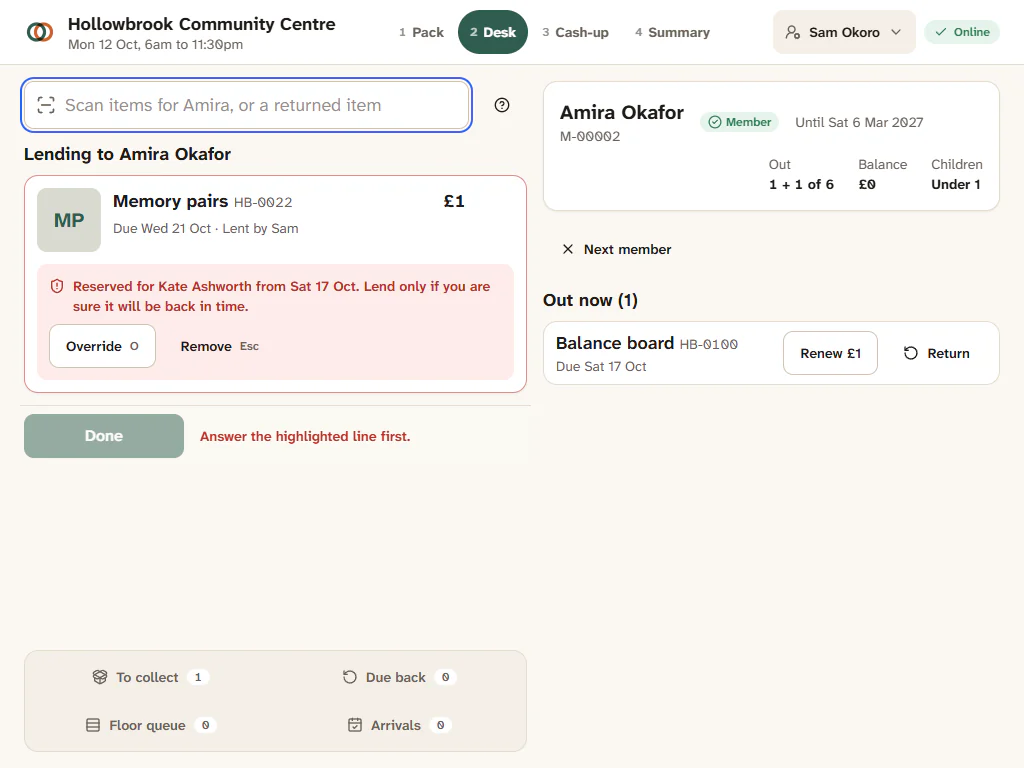
After an override the line reads "Overridden: your reason" and Done works again. If you are not allowed to override, the line says "Needs a coordinator to override."
What happens after an override
Every override is written to the audit log with your reason. If you lend a toy that was reserved for someone else, Gizzago tries to give them another copy; if there is none, their reservation line is marked and they are told, with other options. So use overrides when it really is the right thing to do, and say why.