Reserving toys (for members)
Reserve toys online and have them ready for you at your next session.
Who can do this: members of the library who are signed in. You can fill a basket before signing in, but you need to sign in (or join) to confirm.
Steps
- On the library's website, open the catalogue and find a toy you would like.
- On the toy's page, choose the session you want to collect at, then press Reserve for and the date, for example Reserve for Sat 24 Oct. Your basket opens.
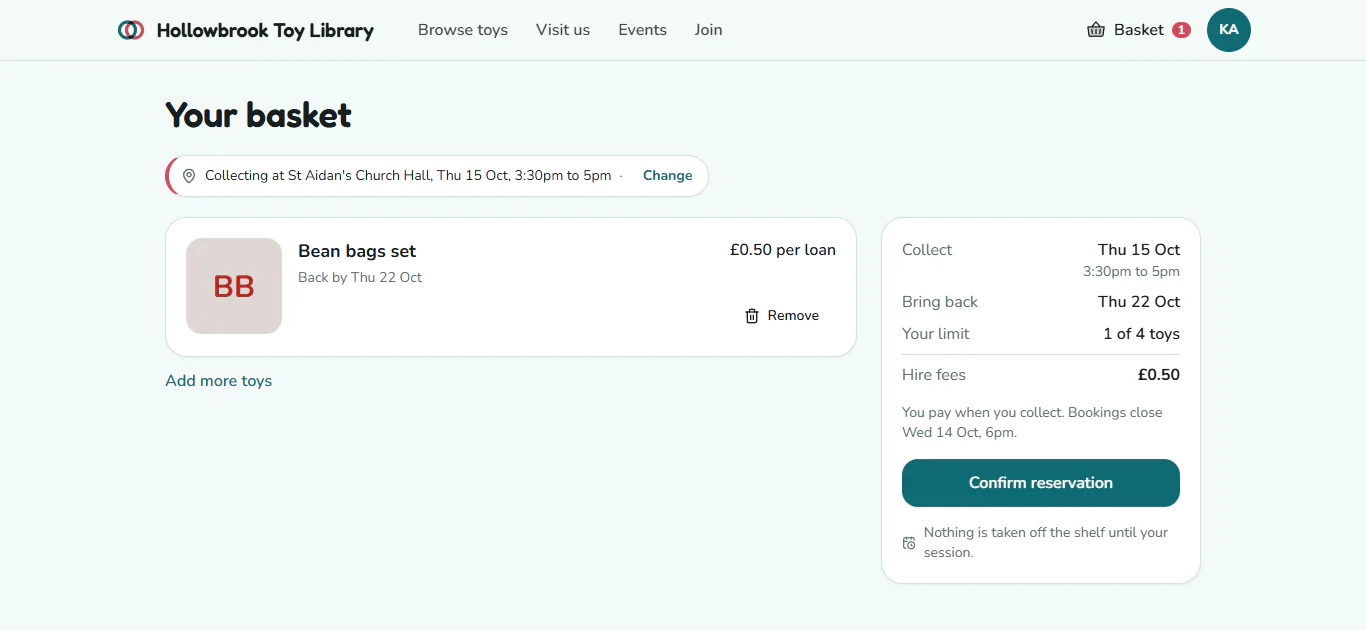
- At the top of the basket, check where and when you are collecting, for example "Collecting at Hollowbrook Community Centre, Sat 24 Oct, 9:30am to 11:30am". To change it, press Change, choose another session (each says Book by and its deadline) and press Collect at this session.
- Add more toys from the catalogue if you want. Each toy in the basket shows when it needs to come back.
- Check the summary: how many toys you have against your limit (for example "2 of 4 toys"), any hire fees, and when Bookings close.
- If a toy says it is not free for this session, press Move to and the date shown to move your whole basket to the next session when everything is free. Or press Remove to take that toy out.
- Press Confirm reservation. If you are not signed in, press Sign in to confirm first.
- On Confirm your reservation, add anything the library should know under Anything we should know? (for example, who is collecting), then press Confirm.
What you'll see
The page says You're booked, with your reference number (for example R-4K7QZ) and an Add to calendar (.ics) button to put it in your phone's calendar. You also get a confirmation email.
Change the session or cancel
- Sign in and go to Reservations in your account.
- To move it, press Change session, then Change session again, choose under Collect at a different session and press Move my reservation.
- To cancel, press Cancel reservation, then Yes, cancel it.
You can change or cancel until bookings close, which is 6pm the day before the session unless your library has chosen differently. After that, contact the library.
Good to know
- Paying. Hire fees are paid when you collect, at the desk.
- The evening before, you get an email asking if you are still coming. Please press Release them if you cannot make it, so another family can borrow the toys.
- Nothing free for weeks? If a toy is booked up, its page offers Tell me when it's back instead. See The waitlist.
- Save for later. Press Save for later on a toy's page to keep it in Saved in your account without reserving it.