Today, your home page
One screen that tells you what is happening and what needs doing, with a button for each job.
Who sees it: coordinators and admins (in full), trustees (a shorter version). It is the first page after you sign in.
Today is a to-do list, not a page of charts. Read it from the top down.
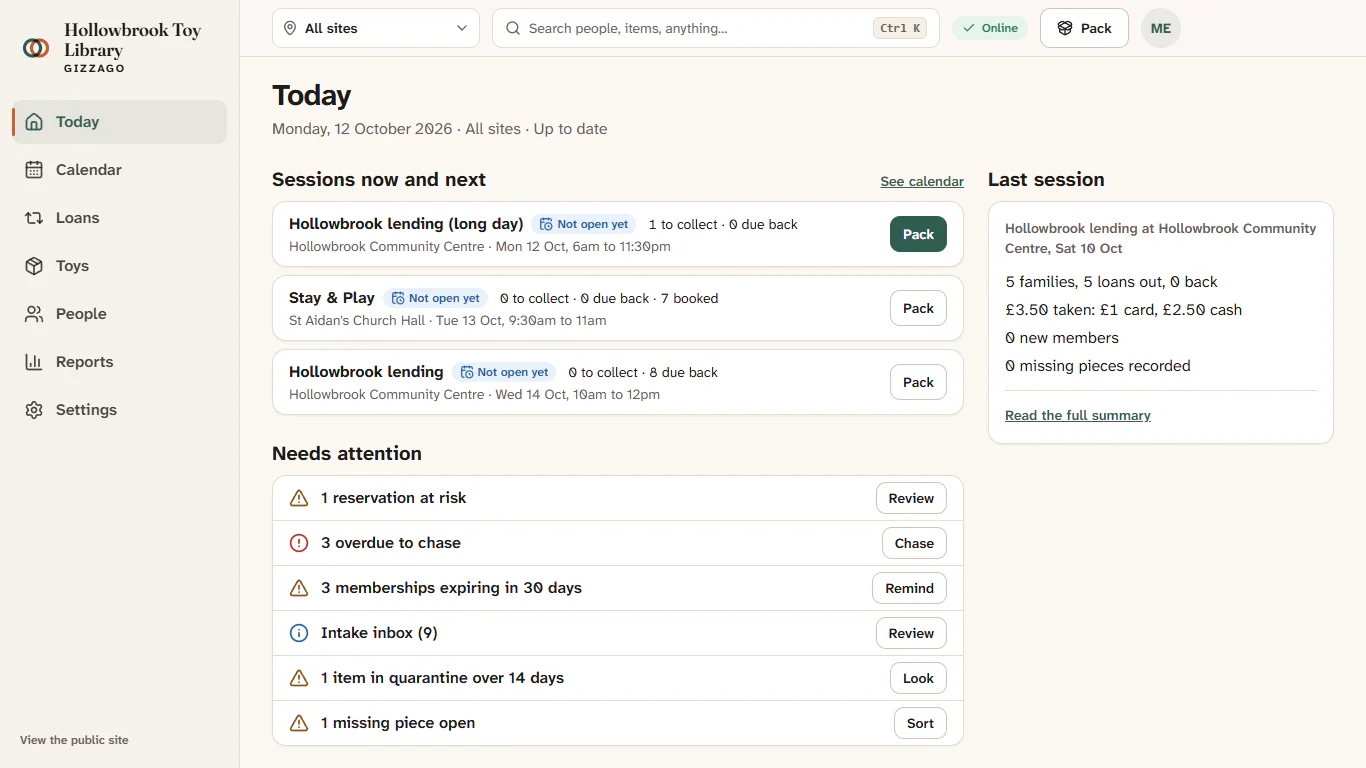
What is on it, from the top
- The date and the site. For example "Saturday 17 October · All sites · Up to date". Use the site switcher in the top bar to see one site only.
- Sessions now and next. Up to three cards. Each shows the site, the times, what state the session is in, how many reservations are waiting to be collected and how many toys are due back. The button on the card takes you into the session: Pack, Open desk, Cash up or View summary. See calendar shows the rest.
- Needs attention. Up to seven rows, most important first. Each row has one button that does the job.
- Last session. Four lines about the most recent session (loans, returns, new members, takings), with Read the full summary.
- Trends, last 30 days. Small tiles such as Loans, New members, Renewal rate, Overdue rate and Earned income. Folded away for coordinators (press the heading to open it); open for trustees. Each tile opens its report.
- Finish setting up. A checklist for a new library (add your contact email, a place you lend from, session times, a membership plan, your first toys, your team and a desk tablet). It disappears once everything is done.
The Needs attention rows
| Row | Button | Where it takes you |
|---|---|---|
| Session not closed | Finish | The cash-up for that session |
| Reservations at risk | Review | Reservations whose toy may not be back in time |
| Overdue to chase | Chase | Loans > Overdue, ready to send reminders |
| Memberships expiring in 30 days | Remind | The people whose membership is ending |
| Intake inbox | Review | Donations waiting to be accepted into the catalogue |
| Toys to catalogue | Catalogue | Toys the desk lent before they were catalogued |
| Items in quarantine over 14 days | Look | Toys > Care |
| Missing pieces open | Sort | Toys > Care, missing pieces |
| Emails bounced | Check | The sent-mail log |
| Payments failed | Review | The payments that did not go through |
When there is nothing to do, the section says All clear.
Steps: a five-minute evening check
- Open Today (it is where you land after signing in).
- Read Last session to see how it went.
- Work down Needs attention, pressing the button on each row. Come back to Today after each one.
- Glance at Sessions now and next for tomorrow: if a card says reservations are waiting, press Pack to see the pick list.
What you'll see
As you clear each job, its row disappears or its count goes down the next time Today loads. When everything is done, Needs attention reads All clear.
What trustees see
Trustees see the last session and the trends, opened out, and a Funder report button. They do not see Needs attention, because they cannot change anything. See The funder report.